> ## Documentation Index
> Fetch the complete documentation index at: https://help.neurapulse.com/llms.txt
> Use this file to discover all available pages before exploring further.
# Managing Workspace Settings
> Update your workspace name, plan, API keys, and redirect URIs from the Workspace Settings page.
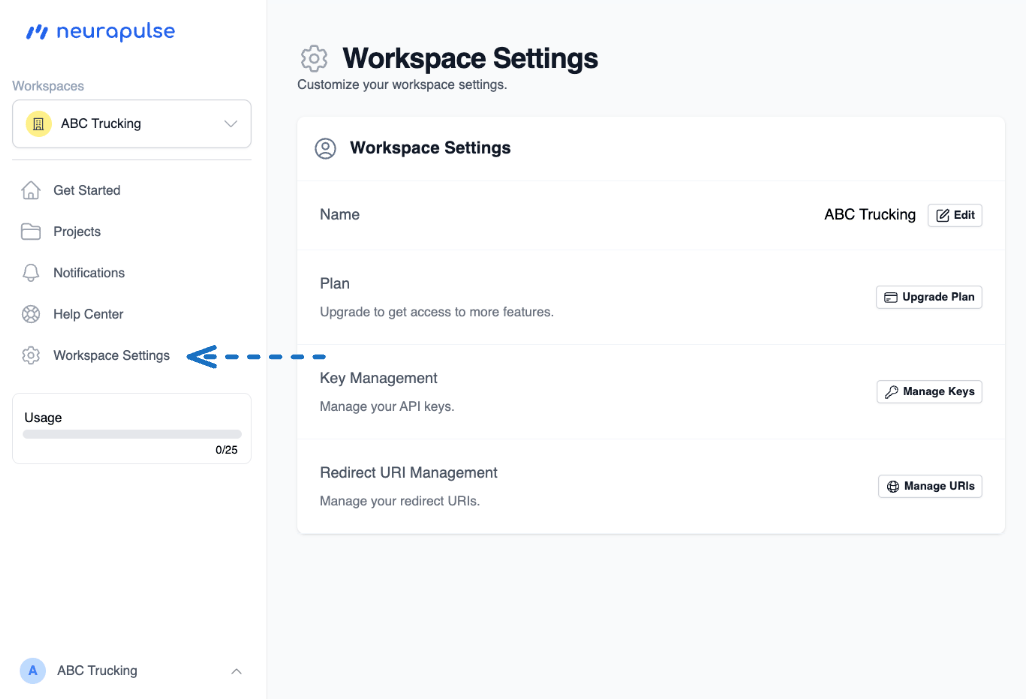
Workspace Settings controls workspace-wide configuration: the workspace **Name**, your **Plan**, **API Keys**, and **Redirect URIs**.
Looking for your phone number, email, or notification preferences? Those moved to your personal **Profile** page. See [Profile and notification preferences](/docs/Getting-Started/profile).
## Opening Workspace Settings
1. Click **Workspace Settings** in the sidebar.
2. The settings card lists each section with an action button on the right.
 ## What you can change
| Section | What it controls |
| --------------------------- | -------------------------------------------------------------------------------------------- |
| **Name** | The workspace display name. Click **Edit** to rename it. |
| **Plan** | Your subscription tier. **Upgrade Plan** opens the billing page. |
| **Key Management** | API keys used by integrations. **Manage Keys** opens the key management page. |
| **Redirect URI Management** | OAuth redirect URIs for SSO-style integrations. **Manage URIs** opens the redirect URI page. |
## Renaming a workspace
Click **Workspace Settings** in the sidebar.
Click **Edit** next to the workspace name. Enter the new name and save.
Renaming a workspace changes the name everyone in the workspace sees. It does not change the workspace ID or any URLs.
## What's no longer here
The workspace email address and workspace phone number rows have been removed. Email is the SSO identity tied to each individual user, and phone is a per-user verification used to unlock SMS notifications - both live on the personal [Profile page](/docs/Getting-Started/profile) now.
## What you can change
| Section | What it controls |
| --------------------------- | -------------------------------------------------------------------------------------------- |
| **Name** | The workspace display name. Click **Edit** to rename it. |
| **Plan** | Your subscription tier. **Upgrade Plan** opens the billing page. |
| **Key Management** | API keys used by integrations. **Manage Keys** opens the key management page. |
| **Redirect URI Management** | OAuth redirect URIs for SSO-style integrations. **Manage URIs** opens the redirect URI page. |
## Renaming a workspace
Click **Workspace Settings** in the sidebar.
Click **Edit** next to the workspace name. Enter the new name and save.
Renaming a workspace changes the name everyone in the workspace sees. It does not change the workspace ID or any URLs.
## What's no longer here
The workspace email address and workspace phone number rows have been removed. Email is the SSO identity tied to each individual user, and phone is a per-user verification used to unlock SMS notifications - both live on the personal [Profile page](/docs/Getting-Started/profile) now.